|
1
|
- Presented by Dr. John F. Clayburg
- www.clayburg.com
|
|
2
|
- Each speaker at the TradeStationWorld Conference acts independently,
and no speaking topic, session, seminar or content is affiliated with,
or approved, sponsored or endorsed by, TradeStation Technologies, Inc.
or any of its affiliates. Topics, sessions and seminars are solely for
educational purposes. The speaker roster and session/seminar content are
subject to change without notice.
No investment or trading advice regarding any security, group of
securities, market segment or market is intended or shall be given. Any
examples used in sessions, seminars or speaking topics are for
illustrative purposes only -- they should never be construed as
recommendations or endorsements of any kind. No particular trading strategy,
technique, method or approach discussed will guarantee profits,
increased profits or the minimization of losses. Past performance, whether actual or
indicated by simulated historical tests, is no guarantee of future
performance or success.
Testimonials may not be representative of the experiences of
other customers and are not indicative of future performance or
success. TradeStation
Technologies, Inc., the host of the conference, and TradeStation
Securities, Inc. (Member NASD, SIPC and NFA), the conference's premier
sponsor, are affiliated companies. "TradeStation," as used in
this presentation, refers to the trading analysis software products,
platforms and services that have been developed by TradeStation
Technologies.
|
|
3
|
- Philosophy
- We do not work in a world of definite certainty
- But rather in an environment of probabilities and possibilities
- Technical Analysis attempts to quantify human behavior – an admitidedly
difficult assignment
|
|
4
|
- Objective Today
- Demonstrate a simple technique to enter a day trade in the direction of
the major trend.
- Directional Day Filter
- Dual Stochastic
- Support and Resistance
|
|
5
|
- The Directional Day Filter is a simple tool that can be used to forecast
the major trend for the day.
- The construction of the indicator is uncomplicated and straightforward.
- The two plots that determine the trend of the day can be easily created
using simple straight lines.
- The indicator is also a free TradeStation compatible download at www.clayburg.com
|
|
6
|
- Construction of the Filter
- Step One:
- Draw a horizontal line at the average price of the first 5 minutes of
the trading session.
- This is the Directional Day Filter Line.
|
|
7
|
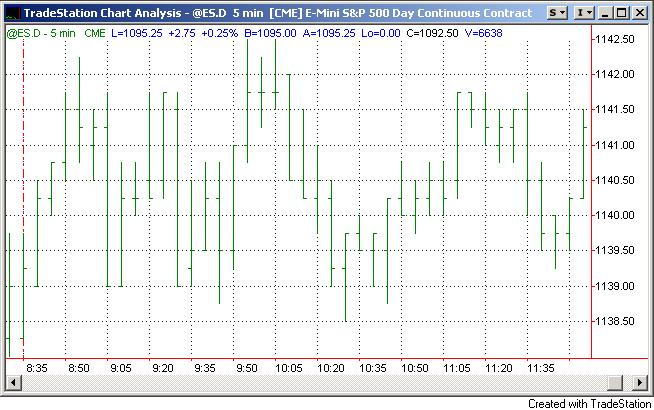
- Draw the Directional Day Filter Line at the average of the first five
minute range
|
|
8
|
- Step Two:
- Draw a vertical line with the top of the line at the intraday high and
the bottom at the intraday low.
- The time at which this plot is drawn may vary with the market and the
trading style of the user
- We will use the 60 minute point for these examples.
|
|
9
|
- Draw the Time Line 60 minutes after the open. The line represents the 60
minute high and low.
|
|
10
|
- Directional Day Filter Code
- Inputs: PlotTime(5),Delay(60) ;
- Vars: NuHi(c), NuLo(c), Med(0),
tclose(0);
- If d<>d[1] then begin
- NuHi = H;
- NuLo = L;
- end;
- If H>NuHi then NuHi = H;
- If L<NuLo then NuLo = L;
- If T = CalcTime(Sess1StartTime,PlotTime) then Med = (NuHi + NuLo)/2;
- If Med > 0 then plot1(Med,"DDFLine");
- If t = CalcTime(Sess1StartTime,Delay) and nulo>0 then begin
- Plot2(NuHi,"hi");
- Plot3(NuLo,"lo");
- Plot4(C,"C");
- If checkalert then alert = true;
- end;
|
|
11
|
- Step Three:
- Make a visual determination of the amount of market activity both above
and below the Directional Day Filter Line prior to the Time Line.
|
|
12
|
- Trend analysis is based on the relative amount of activity above and
below the ddf line prior to the time line.
|
|
13
|
- Trend Determination
- If the amount of activity above the Directional Day Filter line is
greater than that below the line prior to the Time Line there is a high
probability that an uptrend will follow.
|
|
14
|
- If the amount of activity above the line is greater than that below the
line there is a high probability that an uptrend will follow.
|
|
15
|
- The TradeStation automated version indicates an uptrend by changing the
plots to blue
|
|
16
|
- The construction of the filter is the same each day. Here is an example
of the indicator on a down day.
|
|
17
|
- Once again, the trend is predicted by the amount of activity above or
below the Directional Day Filter Line prior to the Time Line
- If the amount of activity below the Directional Day Filter line is
greater than that above the line prior to the Time Line there is a high
probability that a downtrend will follow.
|
|
18
|
- In this example, there is a significantly higher amount of activity
below the Directional Day Filter Line
|
|
19
|
- If the amount of activity below the line is greater than that above the
line, there is a high probability that an downtrend will follow.
|
|
20
|
- The TradeStation® automated version indicates the trend of
the day by changing the plots to red
|
|
21
|
- The determination of the trend is largely a visual interpretation.
- What if the amount of activity on either side of the Time Line prior to
the Directional Day Filter Line is difficult to determine visually?
|
|
22
|
- On some days the visual interpretation can be difficult.
|
|
23
|
- Note that in this example there is approximately the same amount of
activity above and below the Directional Day Filter line.
|
|
24
|
- If the relative amount of activity above or below the line is not
immediately obvious there may not be a dominant trend for the rest of
the day.
- With no significant trend determination in place, one can trade from
both sides of the market.
|
|
25
|
- The days are often trendless when there is a similar amount of activity
above and below the line
|
|
26
|
- On trendless days the TradeStation automated version of the filter will
not change color.
|
|
27
|
- Theory
- The theory behind the Directional Day Filter is that either the high or
the low of the day is established early.
- Therefore any range expansion that is to occur will occur on only one
side of the range.
- Therefore, if the low of the day is made early in the session and the
high is placed later in the day, the trend for the day is higher.
- Conversely, if the high is in place early and the low is established
during the remaining portion of the session, the trend for the day was
lower.
|
|
28
|
- Testing
- A theory must be proven before it can have any valid predictive value.
- The initial research on this indicator was done in January, 2000 using a
data base of 80 randomly selected stocks.
- The test program measured trend confirmation across multiple time
frames.
- The tests indicated that the Directional Day Filter trend definition
accuracy rate was 75%.
- The graph on the next slide represents a portion of the stocks tested at
the 60 minute time line
|
|
29
|
- Testing
- Successful trend definition occurred between 70 – 80 % at the 60 minute
time frame.
|
|
30
|
- The entire data base report for all time frames tested suggests that one
side of the trading range is placed within 60–90 minutes of the open
|
|
31
|
|
|
32
|
- Recent Testing
- To update testing results for the Directional Day Filter and to further
substantiate the validity of the theory, similar trials were performed
using e mini S&P Data from May, 2001 through May 2004.
- As in previous examinations, multiple time frames were analyzed.
- This assessment once again demonstrated that the major trend for the day
was accurately predicted by the indicator on 75% of the days tested.
|
|
33
|
- Test Period Sept 2001 through June 4, 2004
- 60 Minute Time Frame
|
|
34
|
- Recent Testing
- 75% accurate
- REPEAT: 75%
- REMEMBER
- 75 = 100
|
|
35
|
- Support and Resistance
- Quite frequently, after the major trend for the day is designated, the
market will find support or resistance at the Directional Day Filter
Line.
|
|
36
|
- Support
- Note that after the Directional Day Filter has predicted a higher trend
for the day the market finds support at the Directional Day Filter Line.
|
|
37
|
- Resistance
- Note that after the Directional Day Filter has predicted a down day the
market finds resistance at the Directional Day Filter Line.
|
|
38
|
- Use the Oscillators to identify corrections against the major trend
- Traditional use of oscillators buys crosses under
20 – 30 and sells crosses over 70 – 80
- This can lead to many false signals on trending days
- The use I describe is nearly opposite of the traditional use
|
|
39
|
- No trend persists forever
- Corrections occur during any trend
- Use Oscillators to identify exhausted corrections against the major
trend as identified by the Directional Day Filter
|
|
40
|
- Uses 2 diverse settings of the normal stochastic indicator
- The slow ( 45 bar ) setting qualifies the signal
- The fast setting ( 7 bar ) confirms exhaustion of the minor trend
|
|
41
|
- Buy signal:
- 45 Bar Stochastic below 30
- 7 Bar Stochastic below 10; turn higher
- Sell Signal:
- 45 Bar Stochastic above 70
- 7 Bar Stochastic above 90; turns lower
|
|
42
|
- {Dual Stochastic Indicator}
- If FastD(45) < 30 and FastD(7)[1] < 10 and FastD(7)>FastD(7)[1]
then Plot1(L,"DStoch Buy");
- If FastD(45) > 70 and FastD(7)[1] >90 and FastD(7)<FastD(7)[1]
then Plot2(H,"DStoch Sell");
|
|
43
|
- Add simple support and resistance to Directional Day Filter and Dual
Stochastic
|
|
44
|
- Trading with the Directional Day Filter
- Simply give yourself the indicated bias as predicted by the filter.
- Any trading system or routine can take advantage of the information
provided by the indicator.
- Take only long positions on up days
- Take only short positions on down days.
|
|
45
|
- Automation
- Many automated routines can be created using the theories behind the
Directional Day Filter:
- Breakouts
- Buy or sell retracements against the major trend
- Stop loss points
- Support and resistance levels for stop placement.
|
|
46
|
- Free Download
- The basic version of the Directional Day Filter can be downloaded free
from www.clayburg.com
- Additional Information:
- Dr. John F. Clayburg
- 712.684.5239
- www.clayburg.com
- clayburg@pionet.net
|

 Notes
Notes